
Learning and teaching with 360° videos in vocational and professional education and training
Topic outline
-
Chapter 1. Introduction to 360° Videos and Their Educational Value for Vocational and Professional Education and Training
-
1. What are 360° videos?
360° videos are videos recorded with omnidirectional cameras or multi-camera systems that capture the entire surrounding environment. In post-production, these recordings are combined through a process known as stitching to create what is often called a spherical video. In the literature, several related terms are used, such as spherical video-based virtual reality (VR) or, more simply, VR video or 360 VR. Unlike computer-generated VR, which is fully synthetic, 360° videos are based on real-world footage. Viewers can freely change their perspectives and look around in every direction, but they remain fixed at the vantage point where the camera was placed. For this reason, 360° videos are best understood as an immersive form of visual exploration, offering realism and presence, while traditional VR provides greater flexibility and interactivity in entirely simulated environments.
From a technical perspective, 360° videos can be considered a particular form of VR. This becomes clear when we look at how such videos are consumed and the different degrees of immersion. Immersion refers to how much a technological system can create a vivid virtual environment while shutting out the physical world (Cummings & Bailenson, 2016; Slater & Wilbur, 1997). This level of immersion largely depends on the characteristics of the viewing device. In 360° videos, multiple viewing options can be classified along a continuum of immersion (Figure 1):
-
Traditional screens (e.g. desktop computer monitors)
-
Mobile devices (smartphones and tablets)
-
Smartphone-based VR headset ( e.g. cardboard viewers)
-
Stand-alone VR headset
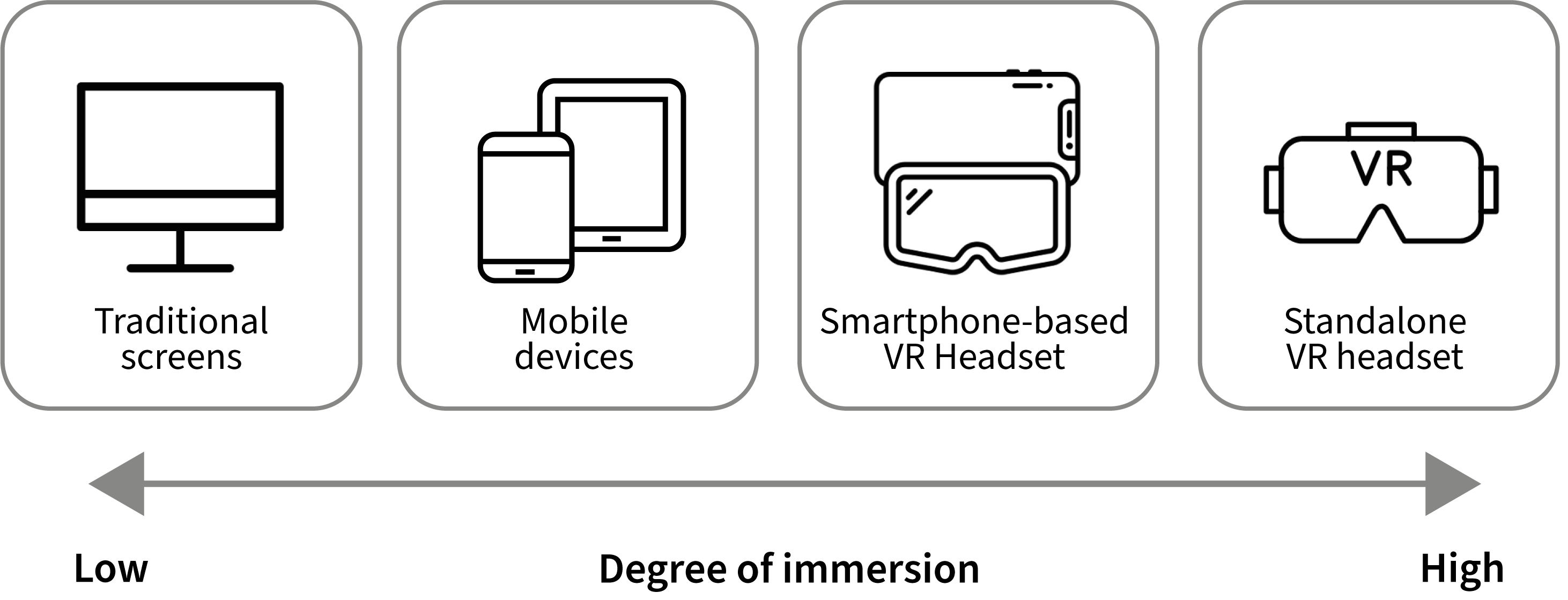
Figure 1. Degrees of immersion in terms of viewing devices.
On a computer, users interact with the video by dragging the view with a mouse because only a portion of the spherical content is visible at once. On mobile devices such as smartphones or tablets, the same effect is achieved simply by moving the device itself with your hands. Cardboard viewers allow users to place their smartphones into a simple headset, offering a more immersive and hand-free experience, although still less sophisticated than that provided by high-end VR headsets. With VR headsets, users experience the highest level of immersion, as the headset provides stereoscopic vision, head tracking and a wide field of view.
-
-
What is an interactive 360° video?
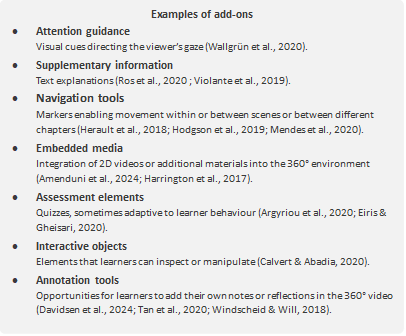
During the editing phase, creators can enrich a 360° video by incorporating add-ons, which are additional elements designed to support learning (Evens et al., 2023). These may be non-interactive, such as explanatory voice-overs presented at specific moments (Ros et al., 2020), or interactive, responding directly to users’ actions. Additional elements require an action to be visible. The add-ons typically require users to interact with a marker to see the additional content. Adding interactivity transforms a standard spherical video into an interactive 360° video, moving it beyond passive observation towards an active learning environment (Wallgrün et al., 2020). When selecting or designing a 360° video, it is important to consider the learners’ level of expertise. Beginners often benefit from additional support, such as voice-overs, captions or hotspots that direct attention, while advanced learners may prefer richer, less structured scenarios. This alignment between video design, learning goals and learner characteristics ensures that 360° videos are used appropriately. In addition, 360° applications offer educators new opportunities for learning analytics. Tools such as heatmaps, viewpoint tracking and areas of interest visualisation allow educators to measure attention and engagement in ways that are difficult to achieve with traditional video (Bibiloni et al., 2018; Tan et al., 2020).
-
2. What is the added value of developing 360° videos for vocational and professional education and training?
The educational potential of 360° videos has been widely discussed in recent literature. One of their most important strengths lies in their authenticity, realism and situatedness. Compared with traditional videos, 360° videos allow learners to perceive situations with greater fidelity and spatial awareness (Baric et al., 2020; Dalgarno & Lee, 2010; Pirker & Dengel, 2021). Especially when experienced through a VR headset, 360° footage provides a powerful sense of being there—the so-called sense of presence—, enabling a form of vicarious experience of reality (Ranieri et al., 2022). Several authors have connected this with theoretical frameworks, such as experiential learning, situated learning and cognitive apprenticeship. This makes 360° videos particularly relevant for VPET, which is highly practice oriented and requires learners to apply knowledge in real-world contexts (Ghisla et al., 2022, 2024). Aside from realism, 360° videos support contextual relevance and empathy. By immersing learners in environments different from their own, these videos can encourage perspective taking and empathy, which are powerful drivers for motivation, even behavioural change (Barbot & Kaufman, 2020; Oh et al., 2020; Wu et al., 2024). Another benefit is related to immersion and motivation. Studies have shown that immersive environments increase intrinsic motivation, situational interest and engagement beyond the initial novelty effect of the technology (Mohd Adnan et al., 2020; Pirker & Dengel, 2021; Rosendahl & Wagner, 2024; Snelson & Hsu, 2020).
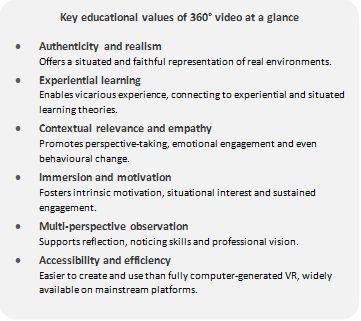
The panoramic nature of 360° videos also enables multi-perspective observation and reflection, freeing learners from the ‘keyhole effect’ of traditional videos. This promotes noticing skills, professional vision and reflective practice, particularly in teacher education and professional training (Ferdig & Kosko, 2020; Theelen et al., 2019, 2020a, 2020b; Walshe & Driver, 2019). Learners’ ability to choose their viewpoints further increases their sense of agency, which supports both cognitive and affective learning outcomes (Wu et al., 2024).
Finally, 360° videos offer the advantages of accessibility and cost effectiveness compared with fully computer-generated VR. Creating 360° videos requires less technical expertise and fewer resources than designing a virtual environment from scratch, making them a more feasible option for many educational contexts (Kavanagh et al., 2017; Ranieri et al., 2022; Wu et al., 2021). On the user side, the technology is generally user-friendly and easily accessible through platforms such as YouTube and Vimeo (Jiang et al., 2024; Rupp et al., 2019), but it also has advantages over on-site practical training. For example, in healthcare, 360° videos provide the opportunity to train specific competencies virtually, which can reduce material costs. Moreover, they can grant access to places that would otherwise be difficult or impossible to reach.
In sum, 360° videos provide added value through two main key features: presence, which is the feeling of truly being inside the environment, and agency, which is the ability to act or make choices within it. Presence is enhanced by realism and the level of immersion, while agency increases when learners can control their points of view or interact with the content. Together, these two dimensions influence important cognitive and affective factors, such as motivation, interest, self-efficacy, reflection and reduced cognitive load, which contribute to improved learning outcomes (Makransky & Petersen, 2021). Thus, 360° videos are not only a technological enhancement of traditional videos but are also pedagogically meaningful tools that can activate the cognitive and emotional dimensions of learning.
-
5. Tools and software
To create immersive 360° videos, the right tools make all the difference. In this section, we introduce the key equipment and software needed throughout the production process—from capturing footage with 360° cameras to editing and adding interactive elements—helping you choose the solution that best fits your project and technical skills.
5.1. Level of technological development complexity
To select the appropriate tools and software, it is first necessary to determine the type of video to be produced. Table 2 presents the four types of 360° videos considered in this handbook, each involving a different level of complexity and requiring specific tools and software.
Type of 360° video Description Software Raw 360° video (not edited) A simple recording straight from the 360° camera, without cuts, narration or added elements. Learners experience the scene exactly as captured. Exported through the camera’s proprietary app or viewer (e.g. GoPro Player, Insta360 Studio). Edited 360° video Raw video refined through basic editing: trimming, sequencing, and adding transitions, background music or a voice-over. This helps guide learners without changing the immersive nature of the video. Requires 360° video editing tools, such as the easy Clipchamp and the more advanced Adobe Premiere Pro and Adobe After Effects (with VR plugins). Interactive 360° video (not edited) Raw 360° video enriched with interactivity (e.g. hotspots to click, questions to answer or branching navigation) but without further refinement to the footage itself. Requires interactive authoring platforms that work with unedited footage, such as 3DVista and ThingLink. Interactive 360° video (edited) The most advanced level as it combines polished, edited 360° footage with added interactive elements. Learners can explore, receive guidance and actively engage with structured tasks. This format supports guided discovery, assessments and branching scenarios. Requires both video editing software (e.g. Adobe Premiere Pro and Adobe After Effects) and interactive authoring tools (e.g. 3DVista and Unity). Table 2. Classification of 360° video types by level of editing and interactivity, with examples of suitable software.
5.2. 360° Camera: A Brief Market Overview
360° cameras are the starting point for creating high-quality immersive content. In recent years, this technology has evolved rapidly, making compact, high-resolution solutions accessible and simplifying post-production workflows. Table 3 provides a brief classification of the existing 360° cameras based on their intended use, image quality and level of professional application.
Category of the camera Description Examples Consumer cameras Ideal for quick productions or projects with limited budgets. They offer ease of use, automatic image stitching and an excellent balance between quality, portability and dedicated software tools. They can also offer versatile solutions with excellent stabilisation and native support for common editing workflows. Price range: below CHF 500. Insta X3 / X4 / X5, GoPro Max Professional cameras Designed for high-fidelity productions, offering full manual control, extended dynamic range and cinematic-level stitching capabilities. These are professional-grade cameras used for VR and cinematic productions. Price range: over CHF 500. Kandao Obsidian, Insta360 Titan 11K Table 3. Classification of 360° cameras by intended use, key features and software examples.
When selecting a 360° camera, you should consider the following:
- Effective resolution (at least 5.7K for high-quality immersive productions)
- Export compatibility with common creation and editing pipelines (Adobe, 3DVista, Unity and H5P)
- Optical stabilisation and exposure control in complex environments (e.g. noisy settings, underwater use, risk of impact or falling)
5.3. Editing software
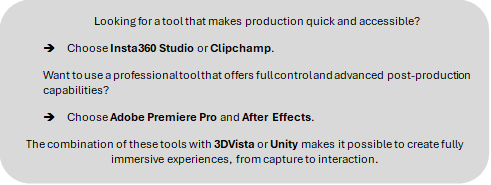
The post-production of 360° content requires software capable of handling equirectangular formats, stitching correction, motion tracking and the integration of graphic elements consistent with spherical perspective. Depending on the project’s level of complexity, different classes of software can be distinguished, as reported in Table 4.
Category Software Description Easy-level tools Clipchamp (Microsoft) Designed for quick edits and adding transitions, audio and some text. Allows only basic editing of 360° videos already processed by the cameras’ proprietary apps (e.g. transitions and cuts). Once the video is exported, it can be viewed only through a VR headset with a compatible player. It can be imported into 3DVista and viewed directly in the viewer. It cannot be viewed in 360° on YouTube VR or VLC (desktop). Insta360 Studio Free and intuitive software fully integrated with Insta360 cameras. Enables trimming, reframing and basic corrections without quality loss. Professional tools Adobe Premiere Pro Industry-standard tool for professional 360° video editing. Natively supports equirectangular formats and includes VR effects, perspective correction and export tools for immersive platforms. Adobe After Effects Ideal for advanced compositing, motion graphics and tracking in 360° environments. With integrated plugins, it offers precise control over orientation and projections. Table 4. Classification of 360° video editing software according to the level of complexity and use.
5.4. Software for producing interactive 360° videos
There are several software solutions for producing and managing 360° videos. Some focus on simplicity and accessibility (no-code/low-code), while others offer advanced development tools for building fully interactive environments. The choice of tool depends on the available technical expertise, the nature of the project and the desired level of interactivity. In this handbook, reference is made to 3DVista, and it was selected mainly because it is the software most used in the 360° video productions that were observed and analysed for the development of these guidelines. In any case, Table 5 provides an example list of possible software solutions.
Software Description Main strengths Technical skills required Limitations 3DVista Intuitive software for creating interactive 360° tours and immersive learning experiences without coding. - User-friendly drag-and-drop interface
- No programming required
- Good balance between quality, features and cost
- Integration of multimedia (text, video, 3D models, quizzes)
- Practical skills in using software for videos and interactive tours, including the integration of various multimedia elements
- No programming skills required
- Limited customisation compared with development engines
- Some features available only in desktop mode
Unity Interactive development engine for full VR/AR applications with control over physics, interaction and rendering. - High customisation level
- Strong for gamified or simulation-based content
- Large asset and plug-in ecosystem
- Requires programming skills (C#)
- Complex development workflow
Unreal Engine Advanced engine focused on high-fidelity, real-time rendering for immersive experiences. - Photorealistic visuals
- Real-time performance
- Suitable for large-scale productions
- Requires C++ programming
— Table 5. Software solutions for creating interactive 360° video content.
-
 This learning unit is licensed under CC BY-NC-SA 4.0, unless otherwise stated for specific content.
-